> For the complete documentation index, see [llms.txt](https://wiki.hobbelcraft.net/llms.txt). Markdown versions of documentation pages are available by appending `.md` to page URLs; this page is available as [Markdown](https://wiki.hobbelcraft.net/features/chestshops.md).
# Chestshops
Verkoop items in je eigen winkel met chestshops. Chestshops zijn chests met een winkel functie. Spelers kunnen met chestshops items van je kopen zonder dat je er zelf bij moet zijn.
{% hint style="danger" %}
Het gebied waar de toekomstige Chestshop op zal staann moet geclaimt zijn.
{% endhint %}
## 🔨Aanmaken
Hou het item dat je wil verkopen vast in je hand. Houd `shift` ingedrukt (bukken) en linksklik vervolgens op de chest dat je wil gebruiken. Nu zou je het volgende in chat moeten zien:  \
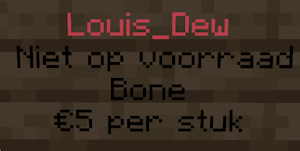
Typ nu in chat het bedrag dat je wil ontvangen per stuk. Als je alles correct hebt uitgevoert dan zou er nu een sign aan de chest moeten hangen.
***
## ⚙️Shop Configuratiescherm
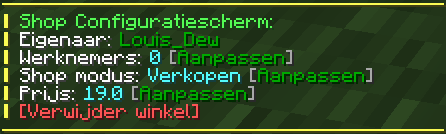
Om in het configuratiescherm te zien, rechtsklik op de sign van je chestshop. In het configuratiescherm kan je allerlei zaken van je chestshop aanpassen.
***
\
Typ nu in chat het bedrag dat je wil ontvangen per stuk. Als je alles correct hebt uitgevoert dan zou er nu een sign aan de chest moeten hangen.
***
## ⚙️Shop Configuratiescherm
Om in het configuratiescherm te zien, rechtsklik op de sign van je chestshop. In het configuratiescherm kan je allerlei zaken van je chestshop aanpassen.
***
"Integratie GriefPrevention heeft de aanmaak van de winkel geweigerd."
Zorg ervoor dat het gebied waar de chest op staat geclaimt is!